
Excel Tools for Small Stores

Excel Tools for
Better Store Decisions

Practical Excel tools for catalog checks, inventory tracking and contribution margin work. Built for store owners who want clearer data and better control.

€5 / €12 / €19 · One-time purchases · Applicable taxes at checkout

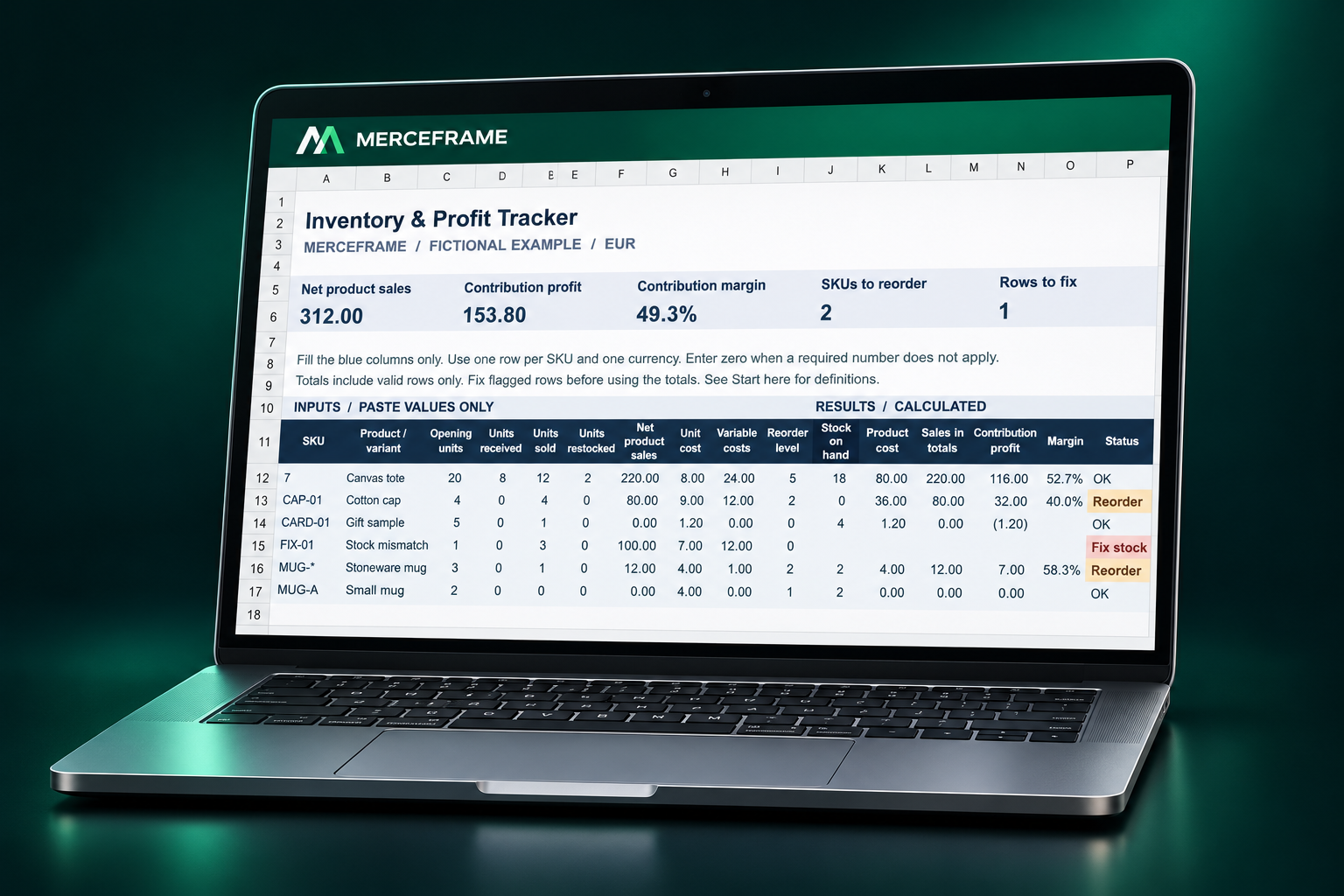
MERCEFRAME Inventory and Profit Tracker shown on a laptop with fictional example data

Illustrative mockup · fictional workbook example
Inspect the exact workbook previews below

Focused, manageable scopeClear limits before you buy.

Work in your own filesNo live store connection.

Written helpAsk a question without a call.

Choose by the job you need to do

Three tools. Three clear roles.

Start with the task in front of you. Each listing explains the files, limits and workflow before checkout.

01 / Before a catalog import
Fictional worked exampleEnlarge ↗

Catalog
Preflight

Check key catalog fields before a Shopify import

  • Up to 250 product or variant rows
  • SKU, price, handle and option review flags
  • Blank template, worked example and guide
Files and important limits

A ZIP containing one XLSX workbook and an English quick-start guide. Copy values into nine input columns; review the flags and make any corrections in a separate copy of your CSV.

It does not repair or upload CSVs, check every Shopify rule or compare against your live store. Missing or duplicate SKUs can be intentional. Checks across separate batches are not combined.

02 / Stock & contribution review
Fictional worked exampleEnlarge ↗

Inventory &
Profit Tracker

Track stock, reorder needs and contribution margin

  • Up to 200 SKUs, one period and currency
  • Closing stock and reorder prompts
  • Contribution profit, margin and input checks
Files and important limits

One XLSX workbook with instructions, a blank Tracker and a fictional worked example. Enter the numbers yourself, including eligible sellable returns from the current period.

No Shopify sync, transaction history, multi-location stock or changing-cost valuation. Contribution excludes overhead and income tax; it is not net business profit. Prior-period returns and stock adjustments need a different workflow.

03 / Both tools & an import record
Live runbook preview · both workbooks includedEnlarge ↗

E-commerce
Toolkit

Get both workbooks plus the import runbook

  • Catalog Preflight + Inventory & Profit Tracker
  • Catalog Change & Import Runbook
  • English quick-start and setup instructions
Files and important limits

A ZIP with both XLSX workbooks, the HTML runbook and English text guides. Each workbook keeps its original 250-row or 200-SKU limit; the files do not sync with each other.

Open the runbook in your browser. Print or save the completed record as a PDF before closing the tab. Entries are held in that tab only: there is no autosave or store integration.

All prices shown are product prices before any applicable checkout taxes. Purchases and downloads are hosted by Payhip. See the listing for the full details.

Before you buy: the workbooks are designed for Microsoft Excel. Formula calculations have been checked programmatically; testing in the native Microsoft Excel application is still pending. Google Sheets compatibility is not verified.

No guessing what is included

Find the right fit.

The Toolkit combines the workflows. It does not increase the capacity of either workbook.

Scroll the comparison horizontally to see all three tools →

Compare the existing MERCEFRAME downloads.
Your taskCatalog PreflightInventory & Profit TrackerE-commerce Toolkit
Best fitReview selected product CSV fieldsReview stock and contribution for one periodBoth tasks, plus a written import record
Capacity250 product / variant rows200 SKUs · one currencySame individual workbook limits
DownloadXLSX + text guide, in a ZIPXLSX with instructions and example2 XLSX + HTML runbook + text guides, in a ZIP
How it worksCopy selected columns; review flagsEnter period totals manuallyUse each workbook separately; save the runbook record
Required softwareMicrosoft ExcelMicrosoft ExcelMicrosoft Excel + a web browser
Price before applicable taxView Catalog Preflight · €5 ↗View Inventory Tracker · €12 ↗View Toolkit · €19 ↗

Why €19 rather than €17? The two standalone workbooks total €17. The Toolkit adds the catalog-change runbook and setup notes. It is a package with an extra workflow document, not a discounted bundle. If you only need the workbooks, buying them separately costs less.

A straightforward starting point

Choose the task.
Keep control of the data.

These are focused, manually maintained files. They do not connect to or change your live Shopify store.

  1. Choose what you need to review

    Catalog fields, period stock and contribution, or both. Check the capacity and limits against your own workflow.

  2. Inspect the files before buying

    Enlarge the real previews and read the product details. Ask a written question if you are unsure about fit or software compatibility.

  3. Start with a copy and a small example

    Use the instructions and fictional worked examples. Keep your original data untouched and check important results against your source.

A few things worth knowing

Clear answers
before checkout.

Still not sure which file fits?
Ask us in writing ↗

Are these Shopify apps?

No. They are downloadable files, independent of Shopify. There is no Shopify app installation, live sync, store access or automatic import.

Is Catalog Preflight better than a free validator?

Not necessarily. Shopify provides free CSV guidance and previews, and free browser validators are available. Preflight is an Excel-based review format for selected fields in small batches; it is not a full Shopify validator or repair service.

Does the Tracker calculate my net business profit?

No. It calculates contribution from your supplied period sales, unit costs and variable costs. Overhead and income tax are excluded. It is not accounting software and cannot verify your physical stock or the accuracy of your inputs.

How are checkout and delivery handled?

The buy links take you to the existing product pages on Payhip, where you can review the product and final total before purchasing. Payhip hosts checkout and downloads. Our full post-order receipt and delivery test is still pending; a successful live card payment or bank payout has not been independently verified.

Can I use the tools for several client businesses?

We are not advertising a multi-client agency licence. Business-use licensing terms are being clarified with Payhip. Please ask us about your intended use before purchasing for a business or client project.

What if I need help or want to request a refund?

Use the MERCEFRAME contact page. We offer written communication, with no call required. Refund requests and file problems must be reviewed under the applicable terms and consumer rights. We do not make an unconditional refund promise or exclude statutory rights.